6.22.2010

How to turn off comments in Blogger

There are times you want to stop readers from commenting on a post, either from the very start or after a certain time.

For instance:
  • If you run a giveaway that has ended, you will want to prevent any new entries after the closing of the contest.
  • If you are writing a post that is unconducive to commenting, such as an About Me or Advertising page, you might want comments turned off from the time you post.
  • If you have posted on a controversial topic and are receiving too many negative encounters with trolls, you might choose to turn off comments on that particular post.
  • If you are going on vacation or need a break from the internet, you might choose to turn off comments until you return and can moderate and reply.

There are many reasons to turn off comments on a specific post1, and it's easy to do in Blogger.


Click on images to enlarge.

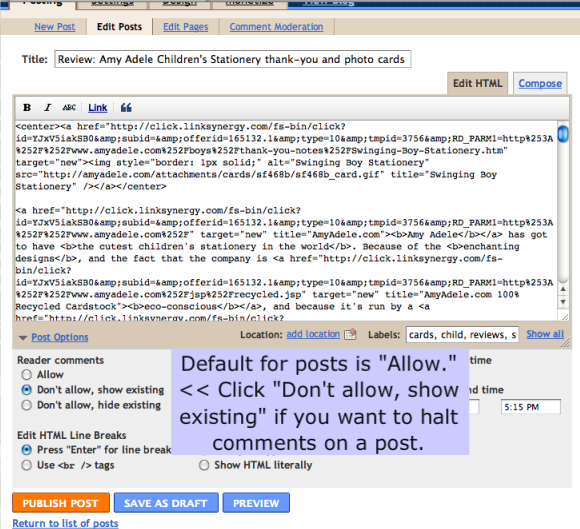
Go into Posting --> Edit Posts, and then click "Edit" next to the post you want to work with. Once on the post-editing screen, you'll see a link at the bottom of the post box that says "Post Options." Click on this to launch a drop-down menu of further options.


In posts, the Blogger default setting is to allow comments. If you want to stop commenting from here on out, click "Don't allow, show existing" (as with a giveaway). If you want to hide all the comments on the post as well as preventing new comments from being made (as potentially with an inflammatory set of comments), click "Don't allow, hide existing." Note that neither setting deletes comments that have been made, and you can revert the settings to "Allow" at any time.

Be sure to click "Publish Post" (the orange button) at the bottom to make your settings live!


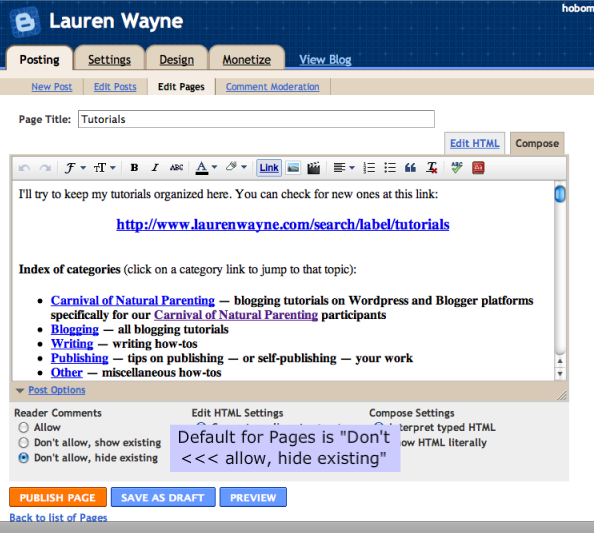
If you are working in the new Pages function in Blogger, be aware that the default setting is "Don't allow, hide existing." You can leave this or change it as you wish. Be sure to click "Publish Page" if you want a change in settings to take effect!


That's it.

It's easy enough, and much easier than putting up flashing warnings on a giveaway that's ended yelling at potential entrants not to enter! It will save those potential entrants from wasting time or feeling embarrassed that they've entered a contest that was over, so it's a nice goodwill gesture if you're a giveaway host. I try to turn off comments as soon as a giveaway has ended.

Stay tuned for a tutorial on turning off comments in WordPress.


1There is also a way to turn off comments on your blog completely, but we can cover that in a separate tutorial.

6.12.2010

Get rid of "You are posting comments too quickly" in WordPress

Here's another easy tutorial for me to write, because I'm not writing it.

I happened across this post from 3 Kids and Us when I was looking for information about that annoying WordPress message that greets me whenever I'm entering a giveaway:
You are posting comments too quickly. Slow down.
That chaps my hide, because — dang it — I want to post my giveaway entries quickly! I don't need to dilly-dally and think about whether I'm following someone on Google Friend Connect. It's especially annoying if I'm just copying and pasting a repeated comment for multiple entries, say 3 entries for grabbing a button — I really don't need time to consider. Come on, just post my comment already, WordPress!

Thank goodness, Cat from 3 Kids and Us knows the solution, so click on over to read about installing the Disable Check Comment Flood plug-in — and then, please, if you are a WordPress giveaway host, do it. Cat also gives advice on how to prevent comment spam after installing this plug-in.

This isn't a problem in Blogger, by the by, where I can post comments as fast my merry fingers can paste them on in.

6.03.2010

A Precious Jewel, by Mary Balogh, and breaking with convention

Defying the genre's expectations


The premise behind Mary Balogh's A Precious Jewel is intriguing to me as a writer.

The book is an (unaltered) rerelease from 1993 featuring two characters from The Ideal Wife — one of whom is only a minor character, a friend of the hero, and the other who is never seen onscreen as it were but only talked about in her absence. To make matters more complicated in terms of the Regency formula, the former does not fit the standard hero mold in his own right, being rather unintelligent and not as fabulously titled as most, and the woman in question is his mistress.

Mary Balogh talks about the dilemma in her introduction to the rereleased A Precious Jewel:
I was writing traditional Regencies at the time and could hardly have a working prostitute as a heroine and a beta male as a hero!

But the characters "haunted" her to the point that, against fellow authors' advice, Balogh sat down and wrote their story in two weeks. She was subsequently surprised when her editor accepted it without question or revision.

I can understand why, though. It was riveting to get through, even as I was made uncomfortable by some of the characterizations and scenarios. I just couldn't stop reading till these two interesting people's lives were resolved.

Now, Balogh does "cheat" a little by making Priscilla Wentworth, the aforementioned prostitute, a down-on-her-luck gentlewoman instead of a typical working-class prostitute. But it's true that Sir Gerald Stapleton is a beta male. He's titled, but he's not astonishingly handsome. More significantly, he's one of the only heroes I've ever read about who isn't all that bright. Usually they're all geniuses and glib with words and magnificent in bed — Gerald hasn't ever kissed a woman before he meets Priscilla.

But their relationship doesn't start with kissing. It starts with something ostensibly much more intimate — a regular encounter at a brothel where Priscilla, aka Prissy, is working. Gerald is so dissociated from his own feelings and so mistrustful of women that this is the only way for him to connect. There were elements of this that were distasteful to read, but Balogh doesn't do a bad job with it — she makes it clear that the way Gerald is treating women and Prissy in particular is not healthy after all, and of course he must change before their love can flourish.

Priscilla, on the other hand, rather besottedly falls in fantasy-love with Gerald from their first meeting, and there is a little sense of "but why?" — for me, more in terms of Why would a bright woman love a dim man? than the other (many) considerations. But Balogh makes it justifiable by showing us Priscilla's attraction to Gerald's wounded and kind heart (underneath it all), and Priscilla never forgets that she is not a suitable candidate for any love or commitment from him in return — she accepts her role in his life and embraces her fantasies for what they are. Priscilla's development becomes more pleasing toward the end, as Priscilla has to learn to be who she is at heart and find people who accept her for herself, past and all. I was a little worried that I couldn't respect Priscilla (not for the sex worker part, but for her lack of feminism about doing Gerald's bidding), but she becomes more real and nuanced to me as the book goes on, as does her development.

In fact, if Gerald is a sort of beta hero, then Prissy is a sort of beta heroine. Every time I read a gentlewoman-becomes-a-sex-worker plot, I have to wonder how believable it is. Priscilla suffers the loss of close family members and ends up seeking out her former governess at her "finishing school" — not realizing the finishing school is actually a high-class whorehouse. Priscilla decides to throw her lot in with Miss Blythe's "girls." Wouldn't most women raised as Priscilla was and given the morals of her upbringing, when presented with several possible options for making a living, choose anything but prostitution? (And, for that matter, how exactly did her ex-governess end up a madam?) I'm still not entirely convinced her choice was realistic, but I realized that if her character had been entirely strong-minded and defiant of expectations, probably she would not have wound up a sex worker at all or would have been a different kind of mistress, and the story would not have happened. So in that sense, her personality (or lack of a strong one, at least) makes a certain sense. I did appreciate how Balogh wove into Priscilla's thoughts a reconsideration of her own choice: that Prissy chose that route before she fully understood the implications, and that she wouldn't necessarily choose it again if given the chance. Indeed, she is given something of a second chance toward the end.

Here's an example that stood out to me in terms of making the earlier portions of sex-for-hire seem less sordid, by pointing out that their relationship at the start was inadequate. In this scene, Gerald is beginning to realize this as he forces her, through his own fear and distrust and immaturity, into the old positions of mistress and employer again:

But she did and said only what her training had taught her to do and say. And that smile, which had always seemed so warm to him, was not warm at all, he saw when he looked searchingly into her eyes. It was not warm, and it was not a smile. It was a shield, a cold and metallic shield behind which she hid.


And so he allowed himself to fall into the ritual she began. He bedded her, and even told her before he joined her on the bed and mounted her that he wanted it the old way. He did not love her body at all. He used it for a pleasure that did not turn out to be pleasure but only physical satiety.

And he was punished justly. She was warm and soft and yielding—and utterly passive. The way he liked his women to be. Sex without a relationship. Physical intimacy without involvement. The illusion that he was in control, that he was master.

It's portions like this that make me as a reader feel less guilty for enjoying the story, even though the hero's often not all that heroic, and even though, as a woman and a feminist, I wish Priscilla had been stronger from the start and not quite so acquiescent.

I feel like both Priscilla and Gerald mature in believable ways over the course of the book, until they become fit partners for each other — who come together not because of circumstance but through choice and genuine love. I thought the very end was extremely touching and not a little humorous.

I'm not trying to spoil the plot, but of course you probably know by now that romance novels end happily…. I'll stop there, though, and let all the details be a surprise!

Limits to doing the unexpected in your own writing


I just wanted to talk a little more about doing the unexpected with your writing. I think there are limits and caveats but also the potential for great things.

First of all, we're not all Mary Balogh with a dedicated following (hi, Mary! *waves*) and a loyal editor. If you're looking to publish your first novel, in whatever genre (including literary), it's probably best to stick to the tried-and-true. Not the boring — put your own spin on it — but when you're trying to get your foot in the door, this is not the time to reinvent the genre.

Secondly, there are limits to how far you can bend the expected even when you are Mary Balogh. If she'd written this same novel but had the characters die in the end (spoiler: They don't!), that would have defied the point of the genre, which is romantic resolution.

Thirdly, and maybe this isn't third, because I didn't really think through this in numbered progression but just as a jumble of thoughts, so maybe it's really just related to one and two, and I'm going to start a new sentence now. [Deep breath.] I think it's easier to change details within a framework than the whole framework itself. For instance, within a typical romance novel formula of guy + girl = love and marriage, you can play around with back story and location. I've seen successful Regencies set in China or the Arabian desert, or dealing with tough issues like incest, alcoholism, spousal abuse, and adultery. There's plenty of room to play within the framework, but it would be sort of silly to write a poem with only 4 lines and call it a sonnet. If you're writing a romance, it needs to be romantic. There are subgenres you can write within, if you want to write a romance between two women, or one set in a futuristic world, or one that contains elements of the supernatural. My understanding, though, is that all of these still need to be … yes … romantic.

Fourthly (?), as relates to heroes and class distinctions and subgenres as well (fifthly?): Regencies are about upper-class England. There it is. Someone in your novel should be part of that world. But I think a successful Regency could play with this by making one or more characters pretending to be part of the world, for instance. And I've certainly seen plenty where one or the other protagonist was of a lower class or not from England originally. Outside the Regency world, there's more leeway to play with class. Contemporary novels are wide open in terms of where you want to set your protagonists on the income ladder, and where in the world you want to plop them. Historicals tend to deal more with the upper class, regardless, but I've certainly read some successful novels that deal with solely middle-class or working-class characters. Western romances (as in Wild Western) in particular come to mind. Most romances play with upper-class settings, and my thought on that is — it's fantasy. It's more escapist to ponder how the other half lives and loves.

I'll leave you with a warning. I was in a writing class where a fellow student was reading his short story. It was written in the first person, and there's a fight at the end where the protagonist narrator is hit in the head, and there the story ends. "Wait, what happened?" we asked in dawning disbelief. The student smiled. "He died." He was quite pleased with himself.

He died? The narrator died? Without warning or foreshadowing or intimation that this was a ghost writing the story? Um, no. The Lovely Bones and American Beauty can get away with breaking one convention because they take the time to set up a believable reason for it. Don't break rules simply for the sake of being different. It's much better to be different with a purpose that helps your story!

When have you broken with convention in your writing or been tempted to? Did it work out the way you wanted? What (published) books have you read that have successfully defied convention?

6.02.2010

Install the DoFollow Plugin for Wordpress

Today I would like to welcome Tom (aka CodeNamePapa), who has written a guest post about how to give your fellow bloggers and Carnival participants a little link love on your site. Tom is an IT guru, and he is one half of the natural parenting duo responsible for one amazing son. You can normally find Tom's wife Dionna over at Code Name: Mama where she shares information, resources, and her thoughts on natural parenting and life with a toddler.

[Editor's note: If you are a Blogger user, stay tuned for a follow-up post on DoFollow for Blogger.]

Hello. I'm here to talk about something you may or may not spend a lot of time thinking about: the inner workings of your comments' links for self-hosted Wordpress sites.1

I could make this the shortest guest post ever and simply say, "Do your commenters a favor and install the DoFollow plugin from Semiologic." But, since I enjoy being "a tech nerd" (or whatever Dionna calls me) I've written plenty more on the subject at hand — if you'd like to have some background information (or don't want to install plugins willy-nilly) please read on.

NoFollow vs. DoFollow for Wordpress blog comments


I'm going to break this post up into three sections:
  1. How do Google's bots search/scan my site, and what is PageRank?
  2. What is NoFollow?
  3. What is DoFollow?

1. Google bots & PageRank:

In a nutshell, part of how Google and other search engines work is as follows:
  • Google has computers (aka "bots") set up to scan the internet for new pages and content.
  • Eventually, a bot will scan your site.
  • Once the bot has seen enough, it will use the links it finds and skip to the next page/article/site to scan.
  • The bot uses links that may be pointing internally to your own site or they may point externally to someone else's site.
"PageRank" is Google's algorithm that determines how important/popular your site is.2 A small part of the formula involves how many pages link to YOUR page. For example, if you have a brand-new site, you'll have low PageRank because no one else knows about your site yet. Older sites or sites that everyone knows about will have higher PageRank because they have more content, and more sites link to that content.

The description above is super-simplified and not a complete explanation of how it works (no one actually knows how it works — except maybe Morpheus), but for this post it will suffice in order to explain the next two points.

2. What is NoFollow?

NoFollow was created about 5 years ago to combat comment spam. Since it was implemented, the default Wordpress setup adds a "nofollow" attribute to any links in a comment. As a search bot reads through your site, it will see the links in comments — but once it sees rel="nofollow" it will ignore the link and move on.

The benefit of this is that should spam comments exist on your site, Google won't use those spammy links as evidence that the spam site has important content, and the spam site won't have its PageRank raised. Why does that matter? Because if a spam site has high PageRank, it could conceivably start appearing higher on a search results page when YOU use Google to find something. I think we can agree that it's a good thing for spam sites not to be boosted in search results.

NoFollow keeps the web a little safer by not rewarding spammers for getting their links displayed on your site and scanned by the search bots. This page — http://codex.wordpress.org/Nofollow — does a lot better job of explaining it in-depth.

You may be wondering, "What about real sites from real people? Shouldn't real sites from loyal readers experience the benefit that a link on my site would provide?" This is where the Do Follow plugin comes in.

3. What is DoFollow?

A link that is considered "dofollow" (i.e. a link that does not have a "nofollow" tag) would tell the Google bot "follow this link and have fun crawling that page, too." The link itself doesn't need to say rel="dofollow" — the bots will follow any link unless it's told not to (i.e. unless the link says rel="nofollow").

What plugin do we recommend to get rid of "nofollow" in comment links? We are using the Do Follow plugin from Semiologic. The plugin simply strips the "nofollow" tag from links in comments, thereby making that link "Do Follow" just like any links you'd place within your own content.

Further explanation can be found on Semiologic's site. You can install the plugin from your Wordpress Admin panel (Plugins, Add New, search for "Do Follow", and Install).

4. Don't Let Spammers Off So Easily

By using the DoFollow plugin, there is a slight risk that a spam link could be scanned by a search bot. Of course, there are additional steps available to keep this from ever happening.

One step is to configure Wordpress to hold all comments for moderation — this means you will sort out manually what comments are spam and which are real. You can also configure Wordpress to automatically approve a comment if that commenter has gotten a comment approved previously (these options are available in your Wordpress Admin screen under Settings, Discussion).

The best way to do the bulk of comment filtering is with the Akismet plugin. It's a tool that has saved us from countless hours sifting through comments to decide which are real and which are spam.

How do you install Akismet? Well, once Wordpress installs, Akismet is already installed, too! All you have to do at that point is activate Akismet from the plugins panel. If you are a Wordpress.com user (meaning they host your site for you) Akismet is running in the background 24/7 without your having to do anything.

Give a Little Link Love to Fellow Bloggers


By installing the DoFollow plugin (or similar), you are giving a little bit of link love to bloggers who take the time to leave comments on your site. Will it encourage people to comment? Probably not3 — but it's one small way you can thank those who provide feedback on your writing.

Have you installed DoFollow or a similar program? Have you noticed any differences?


1 If you are a Wordpress.com user (you host your site through Wordpress.com rather than just using their blogging software on your own privately-owned site), it does not look like you can install plugins of this type.
2 To see what your PageRank is, just visit the PageRank Checker.
3Although you can find various badges and lists to advertise yourself as a DoFollow blog if you think it would inspire your readers.

5.20.2010

How to use FeedBurner to maximize your blog — Part 2: Advanced goodies

Paige of the Baby Dust Diaries is a NASA research librarian by day — and mother to Aellyn and inspiring blogger — well, I was going to say "by night," but let's say be accurate and say all the time. She has volunteered to write a few guest posts on topics that come naturally to her in her line of work. Visit Paige over at The Baby Dust Diaries for more on natural parenting, breastfeeding, gentle discipline, infertility, and life with a miracle baby.

How To Use FeedBurner To Maximize Your Blog — Part 2: Advanced Goodies

By Paige of The Baby Dust Diaries

In Part 1 we looked at the basics of why and how to start using FeedBurner. In this article we'll look at some cool things you can do now that you have a FeedBurner account.

1. FeedFlare

FeedFlare allows readers to share your post directly from their feed reader by putting social media sites directly in your feed. This service is not activated by default, but it is easy to use.

Click on the Optimize tab in FeedBurner and select FeedFlare.

FeedFlare screen on FeedBurner


In the list, select which services you want to include in your feed (there is also a site option which I won't look at in this article). Scroll down to the bottom to see what it will look like in your feed.

FeedFlare Preview and Ordering Screen in FeedBurner


You can click and drag to rearrange your FeedFlares. I think going with the most used services is smart. You can add hundreds more that have been created by users. The one I recommend adding is Twitter which you can add by copying this URL: http://www.feedburner.com/fb/static/flareunits/twitthis.xml into the Add More FeedFlare box

Flare Unit screen for FeedFlare


Once you like the FeedFlares you've chosen and their order click on Activate.

activate FeedFlare in FeedBurner


2. BuzzBoost

Now we can get really fancy. My favorite service in FeedBurner is BuzzBoost. It seems like such a simple thing but it can be really powerful if you know how to use it. What BuzzBoost does is give you HTML code that will embed your blog's feed in any website in which you can put HTML. With one piece of code the feed will update automatically.

So, how does this help? Have you ever wanted to have a static page or widget on your blog with your posts on a particular topic? For example, I have pages on my blog on some of my main topics. For example, I blog a lot about Infertility and I have a static page with some introductory text and then I wanted to show my most recent posts related to Infertility. If you click on the page you can see I have a list of my Infertility blog posts. One way to do this is to manually type in the post title with link and a description each time you make a new topical post. Who wants to do that? BuzzBoost will do it for you automatically!

All you need to know is that you blogging platform has RSS feeds for each of your tags, labels, or categories and how to form them.

How To Find A Specific RSS Feed

In Blogger: Each of your labels has its own feed of the form http://xxx.blogspot.com/feeds/posts/default/-/labelname

For example, when I was on blogger I had the following feed for my label "infertility": http://babydustdiaries.blogspot.com/feeds/posts/default/-/infertility

In Wordpress: Each of your categories has its own feed of the form http://xxx.wordpress.com/category/categoryname/feed/

For example, in Wordpress I have the following feed for my category "infertility" http://www.babydustdiaries.com/category/infertility/feed/

Each of your tags also has its own feed of the form
http://xxx.wordpress.com/tag/tagname/feed/

For example, I have the following feed for my tag "cosleeping"
http://www.babydustdiaries.com/tag/cosleeping/feed/

I have less experience with Typepad, but this page has some instructions on how to get a category specific feed.

Now BuzzBoost the Feed

Ok you have your specific feed — now we want to BuzzBoost it! Log in to FeedBurner and click on the Publicize tab and choose BuzzBoost.

There are a number of settings you can choose for your feed once you Activate the service.

Buzz Boost feed settings in FeedBurner


You can preview what your feed will look like:

BuzzBoost preview of feed in FeedBurner


Once you are happy with how it looks you can copy the code provided:

BuzzBoost HTML code to copy into web page


This code can then be pasted right into the page or Text/HTML widget on your blog. Note: If you normally blog in a visual mode you will need to convert to HTML or Code view to paste the script. (Here's how to get to Edit HTML view in WordPress and in Blogger.)

Voila! Now each time you post something new with that cateogry, label, or tag it will automatically add it to your list!

You might find yourself using this in a number of different ways. Many bloggers have a list of essential posts or favorite posts. You could do this dynamically just by creating a "favorite" tag when you post. You can also embed it directly in a post if you want to load related posts. For example, in my How Did You Find Me post I used Buzz Boost to summarize my posts based on my Google Analytics keywords.

3. Socialize

You can also use Feedburner to send your feed items to your Twitter account. This means that each time you publish a post it will be tweeted automatically. There are many other services to do this (like Twitterfeed.com and this plugin for wordpress) but what I like about using FeedBurner is the options it provides.

Go to Publicize > Socialize

Add your twitter account and choose your options. I really like that it includes a "leave room for retweets" since you want people to easily be able to pass the word about your posts this makes sure that the tweet is short enough to allow a "RT @yourname" to fit before it for retweeting purposes. You can also add hashtags and any additional text.

Select Twitter account screen in FeedBurner


Next you can choose how to order the items and how many new items to post. Note, this only looks for *new* items so you don't have to worry about spamming your twitter followers with multiple, repeat posts. For most bloggers there would only be one new post at a time. You can also use the keyword filter to only tweet items on a specific topic category or label from your blog.

Posting feed on Twitter with FeedBurner


You can see a preview of what your tweets will look like. Don't forget to activate the service.

Sample Preview of Tweets


That's it. Now all of your new posts will go to Twitter automatically!

I hope this helps you save time while maximizing the power of your blog. If you have any questions, I'd be happy to help! Contact me by commenting here or email me at babydustdiaries (at) gmail (dot) com.

5.18.2010

How to use FeedBurner to maximize your blog — Part 1: The basics

Paige of the Baby Dust Diaries is a NASA research librarian by day — and mother to Aellyn and inspiring blogger — well, I was going to say "by night," but let's say be accurate and say all the time. She has volunteered to write a few guest posts on topics that come naturally to her in her line of work. Visit Paige over at The Baby Dust Diaries for more on natural parenting, breastfeeding, gentle discipline, infertility, and life with a miracle baby.

How To Use FeedBurner To Maximize Your Blog — Part 1: The Basics

By Paige of The Baby Dust Diaries

In my day job I create, manage, and teach others how to maximize social media at NASA. Every time I write something like this article about utilizing Twitter, in my mind I'm writing a version for all my blog friends. Since Lauren and Dionna have put such great tutorials here to help specifically for the Carnival of Natural Parenting, I thought it might be nice to share some of the tools I use for blogging as well.

One of the tools I think every blogger should use is FeedBurner. FeedBurner is now owned by Google, but I've been using it since its inception and it just gets better and better. The main goal of FeedBurner is to maximze your blog's RSS feed — allowing people multiple ways to easily subscribe to your content. It actually does much more than that!

Manage Your Feed

If you do nothing else from this article you should definitely do this. Sign your blog's feed up for FeedBurner and change your subscription links to reflect this. First I'll explain why and then exactly how to do this.

Why?

First, it makes it easier for readers to subscribe to your blog. Instead of seeing raw xml like this (click on pictures to see them larger):

raw xml feed data

Your readers will see a friendly page with multiple options for subscribing to your feed including email:

subscribe to Feedburner feed page

Second, it makes your blog's feed free from the specific blog platform you are using. For example if you are on Blogger your feed address is something like http://www.babydustdiaries.com/atom.xml and if you are on Wordpress it looks like http://www.babydustdiaries.com/?feed=rss2. Now, first some RSS readers don't accept all formats, so a feed that ends in atom.xml might not be compatible. More importantly if you ever need to move your blog (like I recently had to from Blogger to Wordpress) all of your readers would need to be notified and go out of their way to resubscribe to your feed.

With FeedBurner you are given a custom feed address similar to http://feeds.feedburner.com/TheBabyDustDaires that will never change. This means when I went from Blogger to Wordpress it was transparent to my readers who were already subscribed. They didn't have to do anything!

How?


It couldn't be easier to sign up for FeedBurner (and it's free!). FeedBurner will even "discover" your feed if you don't know the URL.
  1. You can sign in to FeedBurner with your Google account (the same if you have Gmail, or a Google Reader Account) or you can create an account.
  2. Once you are in, just put the URL of your blog (e.g. http://myblog.blogspot.com) in the FeedBurner box and hit enter. You will then be prompted to give your feed a name and custom addressFeedburner feed info screen
    You want to write down this URL since we'll be using it in a moment. (And you can always find it again at the top of your feed's page under Edit Feed Details.) Click Next.
  3. Next FeedBurner asks if you want to track usage of your feed. You can choose what is important to you here and you can always change your mind later. Click Next.
  4. Now we want to direct your blog's feed to the new address.

    In Blogger:

    From your Dashboard go to Settings > Site Feed and then enter your FeedBurner address (inlcuding the http://) in to the Post Feed Redirect URL box.

    In TypePad:

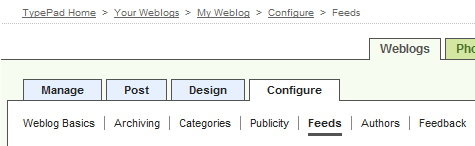
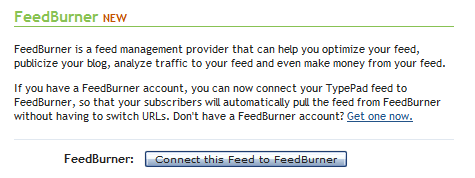
    From your Dashboard go to Configure > Feeds section.Typepad Feeds Tab

    Click on Connect this Feed to FeedBurner.

    Connect TypePad feed to FeedBurner

    Enter your FeedBurner username and password and click Sign In.

    FeedBurner sign in on TypePad

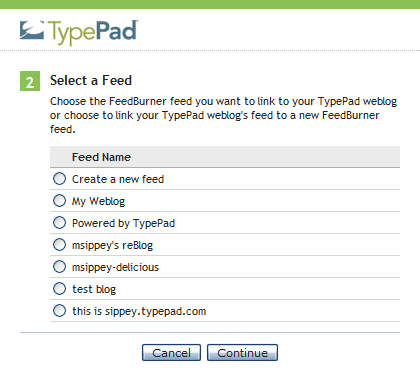
    Select the FeedBurner feed you just created and click Continue.

    Select a TypePad feed

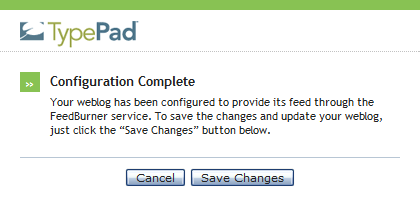
    Click Save Changes.

    Configuration of FeedBurner feed in TypePad complete

    In Wordpress:

    You can use the following method for self-hosted or Wordpress.com hosted blogs. Self-hosted blogs can also use this plugin. Feedburner has what they call a "Chicklet" or image tag that directs users to your feed.

    In FeedBurner click on the Publicize tab.

    Publicize in FeedBurner

    Locate and click the Chicklet Chooser service.

    The form shown below loads into the right side of the screen:

    Chicklet Chooser in FeedBurner

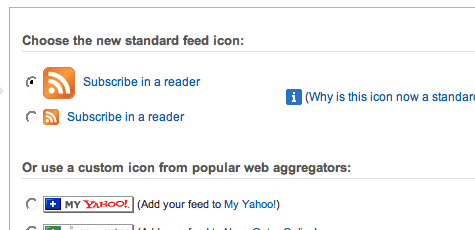
    This form contains several options for buttons that promote (and link to) your FeedBurner feed.

    Click the radio button next to the button you want to display on your site.

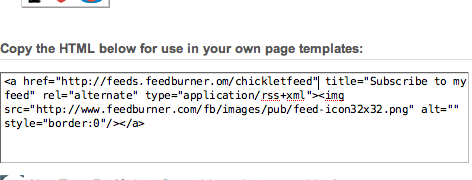
    Copy the HTML shown in the bottom section of the Chicklet Chooser. You will paste this HTML into your WordPress site template.

    Chicklet html code from FeedBurner

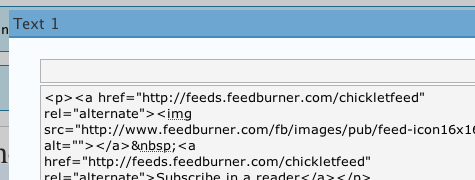
    From the WordPress Dashboard, click the Appearance and then the Widgets option. Drag the text widget from the Available Widgets area to your Sidebar. Click the right side of the widget to expand it.

    Paste the code you copied from FeedBurner in an earlier step into the content field.

    Paste code from FeedBurner into WordPress Widget

    Click Save Changes.

    This Chicklet method also works on many other platforms. You can use a custom image instead of one of the ones they offer by hosting your own image and changing the code for the <img src="http://this is the URL for your image">.

That's the basics of using FeedBurner for your blog! Stay tuned for Part 2 for some advanced FeedBurner goodies!

If you have any questions I'd be happy to help! Contact me by commenting here or email me at babydustdiaries (at) gmail (dot) com.

5.04.2010

Losing a baby, in poems

These first three poems are from 2006, when our first pregnancy ended in miscarriage. You can read the story at HoboMama.com.

Death of the Firstborn

"This Birth was hard and bitter agony for us, like Death, our death." — T.S. Eliot

They all look quite like you at that age,
          and dead like nothing at all,
          a clot of purple-gray, sticky and wrapped with strong, black ribbons.

Feeling you leave in a gush of pain and red,
          in the blackest and loneliest part of the night,
was a hard & bitter agony,
          like giving birth,
giving birth to death.

Why were we led all that way, and never to see your face?
How could I do this again?
Death of the firstborn,
          and God spares no one,
          because why should we be passed over?


End of the Bleeding

Who knew I’d feel this desperate
To hold on to the bleeding?

To realize I can trade in maxi for mini,
And I insist on the industrial-size.

A few more drops of liquid life,
And you’re gone, little one,
Gone,
Along with all that housed you.

My uterus is an empty rented house,
Scrubbed clean,
Waiting for the next inhabitant.


Robin

"I am the resurrection and the life. He who believes in me will live, even though he dies. Do you believe this?" — Jesus

Robin like the hope of spring
Robin like the blue of an egg, the peace of that blue filtering through me and healing

We buried you, Robin,
or maybe it was umbilical cord or placenta or blood (but let’s believe),
in the hardy mum that weathered
summer and winter, drought and flood,
one journey from East Coast to Midwest in the oppressive droopiness of summer,
and one from Midwest to West Coast in the blasting chills of winter,
and even my unmotherly indifference.
Will I one day be a Hardy Mum, Robin?
I feel more like a Bleeding Girl.

Robin, a unique mix of two people who loved you,
and we’ll never know if you had brown eyes or Irish green,
or if you skipped the odds entirely and went with your namesake blue,
like a daring surprise in a nondescript nest.
Would you inherit my chirping child’s always-singing voice,
your dad’s flights into the airy forgetfulness of thought,
my persistent hopefulness for a green thumb as I dig in the dirt?

Robin like a wish
Like a wish
Like a wish


And from this year, on Day 16 of the PAD Challenge, where the prompt was to write a death poem:

Mother after miscarriage

I hardly think of you anymore, Robin,
dear forgotten boy.
Tucked into the roots of the hardy mum,
just a few cells now dissolved,
nutrified, drawn into
the plant that sends out its blooms
early this year,
to remind me.


Poetry of a Hobo Mama: The First Three YearsYou can read more miscarriage and mothering poetry in Poetry of a Hobo Mama: The First Three Years,
available on Amazon and CreateSpace.


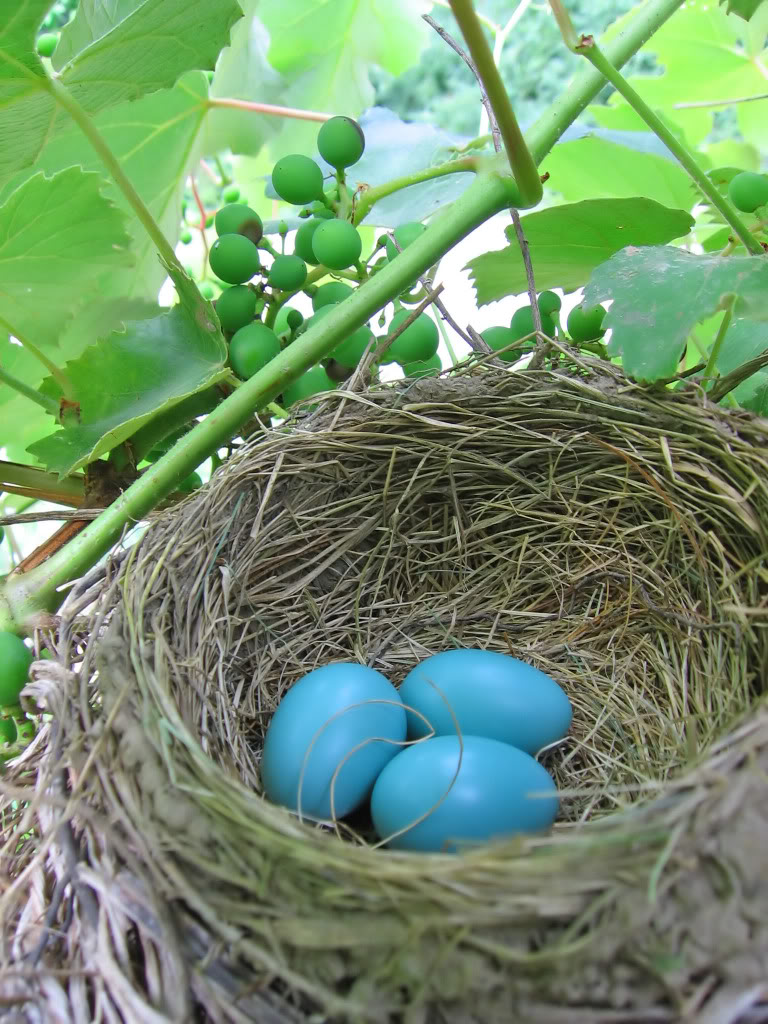
Robin egg photo courtesy Karen Barefoot on stock.xchng
Related Posts Plugin for WordPress, Blogger...