10.10.2010

Uploading a new blog button without changing the button code

UPDATE 2017: Due to Photobucket's banning on third-party hosting, this will no longer work on Photobucket unless you pay for the highest-tier account (which you shouldn't bother). This will still work if you use a dedicated image hosting service — I chose Amazon S3 for now. You can use the same tips below, which I've updated to show my new image URLs.

If you have a blog button or badge (a little square logo advertising your site) hosted on Photobucket, you might have been in the tricky position of wanting to change the button without making everyone who has your button already change the button code on their blog.

There is a relatively simple(ish) way to make it a bit harder on your end but easy-peasy and seamless to everyone else. The next time their pages load, your new button will appear, with no effort on their part. Much easier than sending out pleas to change the code, yes?

The trick is to upload your new button to your web hosting site using the same file name, which will therefore give it the same URL as the old button.

Note: This trick will not, as far as I know, work if you've uploaded your image to Blogger or Flickr, and I don't know if it works on WordPress-hosted images. Which frankly is a good enough reason to advise you to use Photobucket[your own hosting service] for important images, so you have more control. If you host your own images on a server, then the following tips can still apply — but you probably already knew how to do this.

How to keep a direct link in Photobucket[your own hosting service]

For instance, here is the HoboMama.com blog button:
Visit Hobo Mama Natural Parenting Blog button for HoboMama.com


Here is the direct link for that image:
http://images.hobomama.com/hobo-mama-button-200x200.jpg

The piece of information after the last slash is the name of the image file, so hobo-mama-button-200x200.jpg

If you wanted to upload a new picture but keep the same direct link URL, here's what to do, in this order (very important):

  1. Create the new image in your photo-editing software and save it with the same name as the original (e.g., hobo-mama-button-200x200.jpg).
  2. Go to Photobucket[your own hosting service] and find the image you want to replace. Click "delete" on the old image, acknowledging that you will be breaking all the links that are looking for this image (but only temporarily!). Make sure you have a backup of the image on your computer in case you want it in the future. (Optional: You can always re-upload it to Photobucket[your own hosting service] with a different file name [for instance, rename it hobo-mama-button-200x200-archive.jpg before uploading] if you want it archived online.)
  3. Upload your new image to Photobucket[your own hosting service], in the same folder as the old one. The new direct link will be the same as the old one (http://images.hobomama.com/hobo-mama-button-200x200.jpg), as long as you were careful to name your file the same as the old file.

It's important to delete the old image before uploading the new image. Otherwise, Photobucket[your own hosting service] will rename the new file slightly to differentiate between the two and the direct link will be different.

And, again, if you have different folders within Photobucket[your own hosting service], make sure to upload to the same folder, since that becomes part of the URL as well (Elements/ in my example).

This trick comes in handy for regular blog buttons, but also for advertisements and giveaways. Say you wanted to advertise on someone else's blogs, such as for your Etsy shop. You might make your ad seasonal but do all the changes on your end. So, you could create an ad with summer products, and then easily switch it out to winter products later in the year. As long as you kept the file name the same (e.g., hobo-mama-ad.jpg) and deleted the old ad image, you wouldn't have to have your advertisement hosts change their code at all to be current.

Or, for a special giveaway event, such as some review blogs do — a baby shower bash or a holiday-themed event — you could name your button for that something like hobo-mama-reviews-giveaway-event.jpg and then just keep updating the image but under the same name each time. That way, your event button on people's blogs would never be out of date!

Hope that helps, and that all your bloggy fans will appreciate the new image that magically appears on their screens!

10.09.2010

How to make a blog button grab box

If you have a blog button or badge now (a little square logo advertising your site), do you want to know how to make a little box so people can grab the code? Like so:

Visit Hobo Mama Natural Parenting Blog button for HoboMama.com


It's actually really easy. All you need to do is figure out the code for the button, and then place it within this placeholder code:

<form><textarea rows="5" cols="20" readonly="readonly"> INSERT BLOG BUTTON CODE HERE </textarea></form>

You can alter the size of the grab box by experimenting with different numbers for rows and cols (columns). The "readonly" command is optional, but it prevents people from accidentally deleting or editing the code in the box as they're copying and pasting.

Tomorrow I'll give you a tip on updating your image without making your fans change their button code. And if you missed yesterday's post on creating the code, check it out here.

10.08.2010

How to make a blog button code

Do you want a blog button or badge, a little square logo to advertise your site, business, or giveaways? Once you have a basic image uploaded to an image host, it's easy enough to figure out the code.

Visit Hobo Mama Natural Parenting Blog button for HoboMama.com

Here's my basic button code:

<div align="center"><a href="http://www.HoboMama.com" target="_blank" title="Hobo Mama"><img src="http://images.hobomama.com/hobo-mama-button-200x200.jpg" width="150" height="150" alt="Hobo Mama: A Natural Parenting Blog" /></a></div>

From the top down, here are the elements in my button code. You can feel free to copy what you like.
  1. I've chosen to center mine, which is the opening and closing div tags.
  2. Then I have a link to my website: <a href="http://www.HoboMama.com" target="_blank" title="Hobo Mama"> I've chosen target="_blank" so that it opens in a new window when someone clicks on it, and I put my website name in the title tag, so that anyone hovering a mouse over the image will see what page it links to. (You can try it on the top image to see what I mean.)
  3. Now it's time for the real point of this code, which is the image for the button itself: <img src="http://images.hobomama.com/hobo-mama-button-200x200.jpg" width="150" height="150" alt="Hobo Mama: A Natural Parenting Blog" />
    • The src tag is where you put the direct link to your button. (I recommend using Photobucket or [Photobucket no longer possible as of 2017] self-hosting the image, because you'll have some control over changing the file in the future if you ever want to alter the image without changing the button code.)
    • The width and height are how big you want your button to appear, and of course the people who grab your button can alter the size as they wish. A 125x125 is a good standard size. I made mine a little larger — for attention, I guess. You can see from the file name that the button image is actually 200x200, so that fans could make the button as large as that without degrading the quality. I recommend making your button image similarly a bit oversized in case of zealous fans!
    • The alt tag lets you give your image a name, so that it will show up in search engine results. I recommend putting a good, brief description of your blog here. It will also help fans who have lots of buttons keep track of which one's yours when they're looking at the code alone.
  4. Then make sure to close off all the tags you opened: </a></div>
Make sure you test out the button before giving the code to anyone else. Try publishing it in a blog post or your sidebar and make sure the image shows up the way you want it, and that if you click on it, it goes to the right page. Tomorrow I'll have a post on putting your code into a grab box so your fans can get your code for themselves!

9.30.2010

It's almost NaNoWriMo time!

Eek!

I got an email a couple days ago reminding me that National Novel Writing Month is … well, just one short month away. Starting November 1, novelists and aspiring novelists all across the globe will sharpen their pencils (er, keyboards) and begin a dash to 50,000 words by November 30.

Will you be joining the rush?

I seriously had to pause and ask myself that this year. I've done NaNoWriMo two years in a row now, and won both times. ("Winning" = finishing, in NaNo speak.)


This year, I'm pregnant, and have a three-year-old, and a home business, and a new website to launch, and three novels to finish editing, and a lot of other writing to do, and, and, and …

No, I'll probably still do it. It's too good an opportunity to pass up. Isn't it?

How about you? Is this your year to write a novel in a month?

9.06.2010

New rich-text signatures in Gmail

Just as a short update to my post on creating HTML signatures in Gmail:

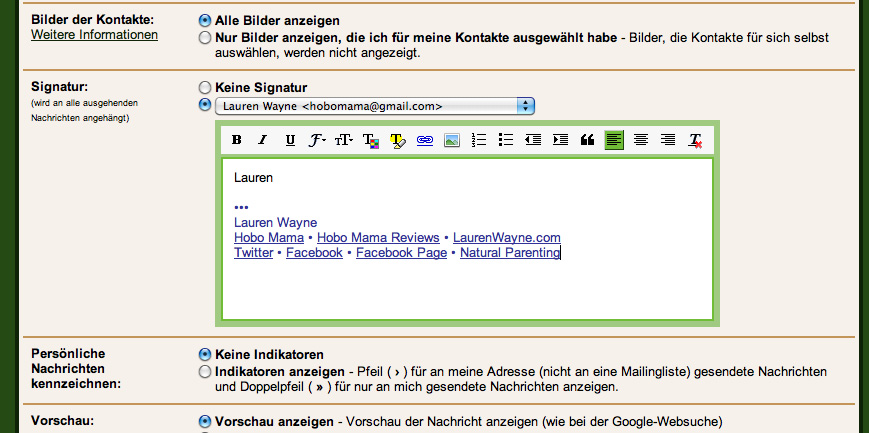
Gmail has finally released a long-awaited function for creating a signature in rich text format.


Click the image to see it bigger. Ignore that it's in German. That's a quirk of mine.

This screen is in Settings in Gmail (which you can reach by clicking the link in the top right corner). The box where my signature is is where you paste in or craft your own signature, and the rich-text icons allow you to control and customize font styles, colors, sizes, and alignment, or to add lists, links, and images.


So that should be easier, all around! I just pasted my previous HTML signature into the rich-text box, and it transferred perfectly. You could also build one from scratch, and you can include URLs and images as you wish, so you can link to your website or social media pages and include an avatar or business logo.

You can even have a different signature for each reply-to address, so if you wanted to have a personal signature and a business signature, that's possible. Or if you run separate businesses (such as a blog and a store), you might have one signature that goes to readers and one that goes to customers. As an author, you could include an image of your book cover and a link to the Amazon buying page.

There's really no downside to having a simple but effective signature. I encourage you to take advantage of the signature function, and personalize the emails your readers receive. Thanks to Gmail for realizing rich-text was the next (overdue) step forward!

8.13.2010

Blocking Google AdSense formula ads for parenting and breastfeeding sites

Updated for the new version of Google AdSense, February 2012

At the bottom of this post is a boxed list of URLs of WHO Code violators to paste into the ad filter at Google AdSense. Feel free to skip there if you know what you're doing. If you want more information on how to filter AdSense ads and how the URLs were chosen, read on.

If you're a breastfeeding activist who wants to abide by the World Health Organization's International Code of Marketing of Breast-milk Substitutes (aka the WHO Code — PDF here),1 but who also wants to pick up a little Google AdSense revenue on a blog, you probably have been stuck with a conundrum.

AdSense sells ad space based on keywords, and advertisers vie for page views and position according to a bid system. Formula companies specifically bid for keywords like "breastfeeding," and they have big budgets, so they often win the page view. They also use deceptive lead-ins like a title offering breastfeeding help, when the ad will spit you out onto a formula page.

Parenting bloggers will in all innocence write a blog post related to breastfeeding success, only to find the accompanying ads undermine their efforts and distress their readers.

Google AdSense filtering options

Google AdSense doesn't have a helpful category opt-out the way BlogHer ads have added, after pressure by PhD in Parenting, with a specific WHO Code-compliant category to check that opts interested members out of ads promoting "infant formula, related companies, artificial nipples or pacifiers or bottles."

The opt-out categories Google offers are more limited:

  • Cosmetic procedures and surgery
  • Dating
  • Drugs and supplements
  • Get rich quick
  • Politics
  • Religion
  • Ringtones and downloadables
  • Sexual and reproductive health
  • Sexually suggestive
  • Video games
  • Weight loss

(You can opt out of any of these categories through the category filter checkboxes at the Allow & Block Ads tab --> Sensitive Categories in the left sidebar.)

However, there is one way to specify which ads you will not allow on your site, and that is by entering specific Advertiser URLs within the Blocking options. Click on the tab labeled "Allow & Block Ads," and then choose "Advertiser URLs" from the links along the left sidebar, under "Blocking options."

Click to enlarge


The premise is to keep competitors' ads off your site, but it can be used to ban any particular URL from appearing. The guidelines Google gives are as follows [text below from an obsolete version of the help center]:
The competitive ad filter works by blocking ads that link to specific URLs. This way, you can easily block all ads that are linked to your competitor at www.example.com. By entering a top level domain such as www.example.com, you'll also block all ads that link to subdirectories below that domain. The following rules apply to the competitive ad filter:

* Entering example.com will block ads to example.com and example.com/sub
* Entering example.com will also block ads to www.example.com and forums.example.com
* www.example.com will block ads to www.example.com but not to forums.example.com or example.com
* example.com/sub will not block ads to example.com/products or example.com/sub/index.html

Generally, it's a good idea to leave the 'www' off of URLs in your filter list to provide for broader filtering.

For our purposes, we will include as many URLs we can that are related to marketing in violation of the WHO Code.

The list parameters

Finding and entering each URL is a tedious and herculean task. Wait, did I just compare myself to Hercules? Well, at least someone amenable to tedium.

The list below contains:

  • URLs for formula websites for multiple countries (with relevant and varied domain endings, such as .com, .de. .co.uk, etc. — in some cases, no specific site exists as of yet at a specific domain suffix, but I've included them in case a site is added at some time in the future)
  • websites of parent companies of formula companies
  • other WHO Code violators' websites, such as bottle or breast pump manufacturers that do not abide by the WHO Code
  • websites of related products (such as other brands and sub-companies under the violating parent companies, like Butterfinger for Nestlé and Simplisse for Dr. Brown's)
  • websites that consistently advertise such products or under such keywords (for instance, Target and YouTube, respectively, any of which URLs you are welcome to remove from the blacklist if you disagree with such reasoning; I was getting pretty annoyed after seeing them time and again when searching for formula keywords and can't guarantee they won't have similarly offensive ad content)

I've compiled as many as I could by searching for formula product names in multiple countries, and by going to the root company websites to gather as many brands and products as I could and then search for their URLs. As I searched, I also looked along the side and top for Google Ads (hey, find 'em where they live!) and blacklisted any ads that consistently showed up for formula keywords, that promoted formula or bottles in violation of the WHO Code, or that appeared to be advertisements for the companies on the blacklist.

I would like to thank TheLactivista on Twitter, PhD in Parenting, and Crunchy Domestic Goddess for giving me a solid head start. The rest was booooring Google searches for all the domains I could find. Thank goodness Nestlé is thorough in promoting its brands and URLs.

Reporting problem domains

The problem with this list is that formula companies are sneaky and are always coming up with new URLs to weasel past any such filters. Please report any new offending URLs you see in a Google ad (it must be the URL at the bottom of the ad, not the name or text above) so that I can add it to the list. We will not be able to eradicate unwelcome ads from showing up, but this list will hopefully cut down on the amount of unintentional page views, make the WHO Code violators' job harder, and continue our activism for breastfeeding support against the unethical marketing practiced by WHO Code violators.

To report new URLs that are in violation of the WHO Code, leave a comment on this post or contact me by email. To ensure violating companies are not given link love, any comments you leave with a URL can be obscured by adding spaces or spelling out "dot com" or similar techniques.

Activating the blacklist

To activate the list on your AdSense, go to your Adsense homepage and then select the "Allow & block ads" tab along the top. Click on "Advertiser URLs" in the left sidebar (see first screenshot), and then copy and paste the contents of the box below into the text box at the top of the ad-blocking page. Click "Block URLs" to save.

Click to enlarge


At the top where it says "Advertiser URL > Product:" you'll see that the "Content" field after that is a drop-down menu. Click on it and choose other AdSense products that you use. Paste the same list into each of those. For instance, I also participate in AdSense for feeds and search, so I pasted it into those products for my account.

Click to enlarge


Anytime a new URL is reported, come back to this page to copy the newest list, or enter it manually in all three boxes and save your changes.

The URLs are automatically sorted in alphabetical order, so it's easy to find a specific one.

Here is the list of URLs to block

Click within the box, then select all and copy.

Remember, we need your help to monitor for new URLs that must be blocked. Please report the specific URL by leaving a comment on this post or contacting me by email.


1 I will be writing more about the WHO Code and why it's important over at Hobo Mama, my parenting blog. As a quick summary, the WHO Code seeks to stem the outrageous marketing techniques used by infant formula manufacturers and related companies to undermine breastfeeding globally, despite such companies' clear knowledge of the WHO Code. Violations of the WHO Code have been disastrous for babies in developing nations and have had measurable deleterious effects on breastfeeding success and infant health in developed nations. Promoting the WHO Code is about ensuring the dissemination of appropriate information about infant feeding and supporting parents' choice in the matter, and is not an attack against any parents for their own choices or experiences in infant feeding.

8.02.2010

Taking a rest from writing: One Sabbath day a week


When I was little, my dad and I read the Little House books together, and I remember being so impressed, but in a negative way, with what passed for a Sabbath around their house. Sundays were spent being bored out of their skulls — wearing clothes that couldn't get dirty, reading only the Bible, and attending, quietly, very dull church services.

It was from such pictures I got the idea that taking a Sabbath — one day of rest in the week — was unpleasant and tedious.

It wasn't until I became an adult that I grew to appreciate having a regular period of rest from work.

As a writer and blogger, my mind can whirl in a million directions at once. There are nights I can't get to sleep for going over and over nitpicky details about my site template's CSS code or the dialogue I want to tweak in my novel. When I finally do sleep, it will be fitful and filled with the same thoughts I had while awake — but completely unproductive. I'll wake up and think, "Yea! I solved my template problem. I'll just insert a penguin in … wait, no, that's probably not right."

When I start feeling unbalanced and edgy, then I know I need a break. But it's even more preferable to take one before I get to that point.

That's where the practice of a weekly day of rest comes in.

Unlike the Ingalls girls, our day of rest is a lot more relaxing and a lot more fun. It's a day to do what we want and not what we don't want. Maybe I want to write, and that's ok — to a point. If I'm writing because I feel I have to, then it gets shelved to another day.

If I want to do nothing in particular but, say, play Sims and watch junk on TV, that's allowed.

Chores are optional, as well. If I feel like doing a load of dishes because it's meditative, great. But if the thought of gathering all the laundry makes me feel anxious, then that waits for the next day.

What's not optional about our particular day of rest is spending time together. We've made a point of doing fun things as a family of three and as a couple on our Sabbaths as a way to reconnect and de-stress.

I sometimes also use my days of rest to connect with other loved ones, whether by working on sewing gifts that have gotten pushed aside during the week in favor of more urgent tasks, or by writing emails and letters.

I might also choose to garden, or work on a craft, or take a long walk. In the flurry of writing and parenting, sometimes I forget there is more to me, and the variety of tasks I can allow myself to do on a non-work day reminds me of the facets I don't see as much of.

Your day of rest could be any day of the week. We chose Sunday, because it's the day we have with the fewest built-in obligations. A pastor friend I know has his Sundays booked with work (no surprise), so he chose Monday. It could even be a floating day of rest that you schedule in each week as your calendar allows.

You could also choose not to have one day a week but more than one, or one day every other week, or one a month. Whatever recharges you and keeps you going is the point, but there's an established tradition by the wiser people among us that one day in seven is a good target to shoot for.

I also need longer stretches periodically to rest. We call these vacations. I usually have a lot of ambitions about what I'll accomplish, writing-wise or reading-wise or knitting-wise, on my vacations, and I usually accomplish nothing much at all. And you know? That's fine. By the time the vacation's over, I'm ready … to extend it. Once you start taking a rest, you'll realize it's not as antsy-making as you thought it might be. It's actually quite nice.

When I was in school and had a lot of deadlines, the idea of taking off one day a week seemed impossible. Now I know I could have used it even more so then. I challenge you to try, really hard, to reorganize your schedule so that a weekly day of rest is possible. This might mean saying no to some commitments and yes to your own need for peace. It might mean working ahead the day before instead of procrastinating. (Guilty here!)

If it's not possible to have a regular day of rest, then don't stress yourself more about not having a de-stressing day. Just set it aside as a possibility for later.

Keep in mind that a self-imposed day of rest does not need to be religiously observed. If you have a special circumstance where you truly must work through that week, then do so, and try to take care of yourself later with some extra recuperation after the crunch period.

Even when you can't manage a day of rest, taking times of rest within your day can be soothing as well. For me, when I eat a meal, I try not to work and just to enjoy myself. That means that while I'm working, I can be looking forward to that next mealtime break to give me a chance to reconnect with the outside world and with the pleasure of good food and good company. I also try to have a clear period of relaxation before bedtime to prevent some of those whirly dreams that distract me from sleeping.

The benefits of regular rest are many. I find less tendency to goof off when I should be working when I know there's a scheduled goof-off period coming. It also gives more balance to my days. Whether you work for yourself or a boss — but perhaps especially when you're self-employed – you need to know there are times when you're off the clock, when you can do something not for hope of financial gain or toward some lofty goal but because it pleases you. In rest, I become more aware of how significant — or, to be completely clear, insignificant — my work and my presence can be. It is in fact entirely possible for me to take one day off a week and have no one miss me. The world continues to spin on its axis even when I take a two-week vacation. Rest reassures me that there is more to my life, and more to this beautiful world, than writing. But it also energizes me and gives me strength to come back to that writing, to the work I love, and continue on. Rest, properly taken, gives perspective, balance, and rejuvenation. I think that's worth a day out of seven.

How do you take time off as a writer? How does it help your writing?

Photo courtesy Kevin Jaako on flickr (cc)
Related Posts Plugin for WordPress, Blogger...